
Best OK-to-Wake Clocks for Toddlers Who Get Up at 5am
There is a specific sound a toddler makes at 5:04am. It's the doorknob. Then small feet, then a face two inches from yours asking if it's morning. It is not morning. It is barely Tuesday.
An OK-to-wake clock won't make a kid sleep longer by itself. What it does is answer the "is it morning?" question for them, with a color they can read before they can read numbers. The best OK-to-wake clock for most families is the LittleHippo Mella: no app, no Wi-Fi, a yellow warning light 30 minutes before wake time, and a face that a 2-year-old understands. Below are five more picks for different houses and budgets, a comparison table with live prices, and the exact plan for getting a toddler to actually obey the thing.
If the problem is less "up too early" and more "out of bed 11 times before 9pm," start with my 3-step reset plan for a toddler who won't stay in bed. The clock fits into that plan too.
Best OK-to-Wake Clocks: Quick Comparison
"App" means you need a phone to set it up or change the schedule. For a lot of tired parents that's a feature. For others it's one more thing to break at 9pm.
| Clock | Wake signal | App needed? | Sound machine | Power | Price | Best for |
|---|---|---|---|---|---|---|
| LittleHippo Mella | Face plus yellow, then green | No | Yes, 3 sounds | Plug-in | $54.99 | Most families |
| Hatch Baby | Any color you pick | Yes, Wi-Fi | Yes, plus stories | Plug-in | $66.49 | Baby-to-preschool, one device |
| Learn & Climb Stay-in-Bed Clock | Red, yellow, green | No | No | Plug-in, battery saves settings | $29.99 | Simple stoplight on a budget |
| Windflyer Little Teddi | Face plus color | No | Yes | Plug-in, battery saves settings | $27.70 | Button-pushers (child lock) |
| Ooly Owl | Color glow | Yes, Bluetooth | No (on purpose) | Rechargeable, no cord | $94.00 | Cord worries, travel |
| UrbanHello REMI | Face changes expression | Yes | Yes, plus speaker | Plug-in | $56.24 | Gadget lovers, audio monitor |
Prices as of Nov 28, 2026, 5:32 PM UTC. Product prices and availability are accurate as of the date/time indicated and are subject to change. Any price and availability information displayed on Amazon.com at the time of purchase will apply to the purchase of this product.
How Does an OK-to-Wake Clock Actually Work?
You set two times: bedtime and wake time. Between them, the clock shows a "stay in bed" signal (a sleeping face, a red light, stars, a moon). At wake time it switches to a "you can get up" signal, usually green. Some add a yellow "almost time" stage first, which turns out to matter a lot for toddlers who wake 20 minutes early and then lie there negotiating with the ceiling.
The point is that a 2-year-old can't read 6:30 on a digital clock, but they can tell sad face from happy face, or red from green. The clock becomes the bad guy instead of you. "The clock says it's still night" lands better than "Daddy says go back to bed," because you can't argue with a nightlight. You can absolutely argue with Daddy.
Hatch's own guidance says many toddlers start to understand simple cause-and-effect cues like this around 18 months, and most sleep consultants and review sites put the sweet spot at 2 to 3 years, especially once a kid is in a toddler bed and can get up on their own.
What to Look For Before You Buy
- A pre-wake stage. A yellow or "almost" signal 15 to 30 minutes before wake time gives early risers a target they can see coming. The Mella does this out of the box.
- App or no app. App clocks let you change wake time from the couch and set weekend schedules. Non-app clocks keep working when the Wi-Fi doesn't. Pick based on which failure annoys you more.
- Settings that survive a power blip. One of the most common complaints across these clocks is losing your settings when the plug gets bumped. Look for a backup battery for memory, or know that you'll be re-entering times now and then.
- A dim night setting. If the "stay in bed" light is bright enough to read by, it can keep a light sleeper up. You want very low brightness overnight.
- Kid-proof controls. A toddler who figures out the button that makes it green will use it at 4:45am. Buttons on the back, a child lock, or app-only control all help.
The Best OK-to-Wake Clocks for Early-Rising Toddlers
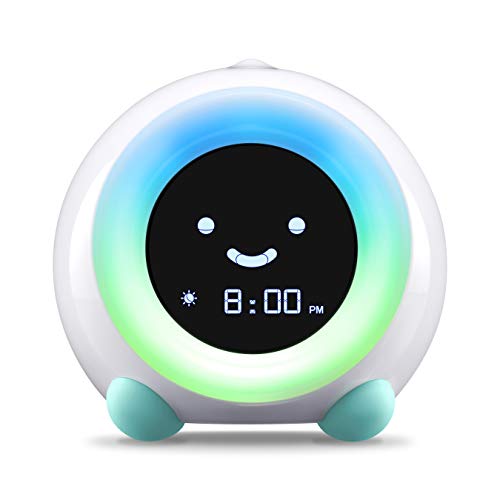
1. LittleHippo Mella Ready to Rise: Best Overall
- Face closes its eyes for sleep, glows yellow 30 minutes before wake, green with a smile at wake time
- 3 sleep sounds, 5 night-light colors
- 3 alarm sounds plus a silent countdown timer for naps or time-outs
- No app, no Wi-Fi; updated 2025 version
The Mella shows up on almost every major list (Babylist, Lucie's List, Fatherly, and Reviewed all include it), and the reason is boring in the best way: it's easy for a toddler to read and easy for a parent to set without downloading anything. The face does the communicating. Eyes closed means stay put. Yellow means almost. Green and smiling means go find Dad.
That yellow stage is the killer feature for a 5am kid. A toddler who wakes at 5:40 and sees yellow at 6:00 has something to wait for, which is a lot easier than staring at a sleeping face with no idea how long "night" lasts. Reviewed's tester also called it the only clock in their lineup whose alarm reliably worked, which matters later when you're using it to wake a preschooler for school.
The trade-offs are real, though. Lucie's List notes that if you unplug it, you have to enter your settings again. Reviewed pointed out that there are no day-by-day schedules, so if you want a later wake time on Saturday, you change it by hand Friday night.
- Yellow "almost time" light built in
- Works with no phone, no Wi-Fi
- Sound machine and night light in one
- Loses settings if unplugged
- No separate weekend schedule
- Buttons are reachable for a determined 3-year-old

2. Hatch Baby (Rest 2nd Gen): Best App-Controlled
- Sound machine, night light, and Time-to-Rise cue in one
- Controlled by the Hatch Sleep app over Wi-Fi; set schedules from your phone
- Sounds include pink noise and heartbeat, plus stories and songs
- Listing includes 3 months of Hatch's sleep support membership
This is the device a lot of families already own from the baby years, now sold as "Hatch Baby." If one is sitting in the nursery running white noise, you may not need a new clock at all: switch on its Time-to-Rise cue in the app, pick a wake color, and you're in business. Hatch's own toddler-clock guide suggests a dim red all night (around 1 to 5% brightness) and a different wake color, and you can set it all without touching the device, which means no tiny fingers learning which button does what.
The catch is the app. Best Buy's review summary notes that some owners have had Hatch app connectivity issues, and a few reviewers say the unit needs to be reconnected after a power outage or doesn't do much without Wi-Fi. There's also the membership: the listing bundles 3 months of Hatch's sleep support, and some owners grumble that extra content sits behind the subscription. The clock and light features themselves are what you're buying it for.
- Change wake time from bed without going in
- Lasts from newborn white noise to preschool clock
- No buttons for a toddler to master
- Depends on Wi-Fi and the app
- Membership upsell after the included 3 months
- No face, so younger toddlers rely on color alone
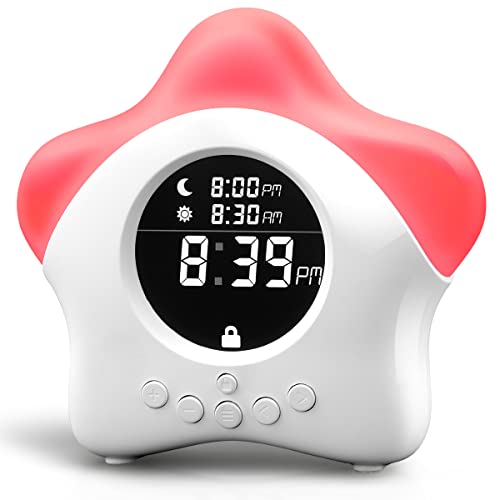
3. Learn & Climb Stay-in-Bed Clock: Best Simple Stoplight
- Red means stay in bed, yellow means almost, green means up
- Night light and a regular alarm
- DC adapter included; backup battery slot saves settings in a power outage (batteries not included)
- No app
Red, yellow, green. Every toddler already knows that system from car rides, and this clock uses it with no extra noise. It's the right pick if you don't want a sound machine (or already have one) and just need a clear signal on the dresser for about half the price of the Mella.
The detail I like is the battery backup for settings. Toss in batteries once and a bumped plug or a storm outage doesn't erase your times, which is the complaint that follows most clocks in this price range. It doesn't have a face, so for a kid just turning 2, you'll lean harder on practice runs (see the training plan below).
- Stoplight colors kids already understand
- Has a yellow pre-wake stage
- Settings survive outages with batteries in
- No sound machine
- Backup batteries sold separately
- Plain design, no character
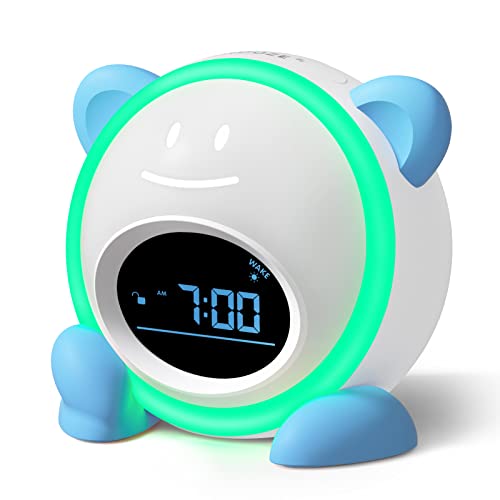
4. Windflyer Little Teddi: Best Budget Pick for Button-Pushers
- Facial expressions and light colors for sleep, optional quiet play, and wake
- Sound machine, alarm, and nap timer
- Child lock: long-press to unlock the panel
- Built-in battery keeps settings through a power outage
If your kid is the type who will find the one button that turns the light green, the child lock is the reason to buy this one. It also has a face, which the stoplight clocks don't, so a younger toddler gets the same "sleeping bear means stay in bed" cue the Mella gives, for a lot less money.
The optional "play" stage is a nice middle ground for families who are fine with a kid quietly looking at books in their room before wake time, as long as nobody comes knocking. Expect a more basic build than the Mella; this is a budget clock, and it looks like one up close.
- Child lock stops the 4:45am green-light trick
- Face for younger toddlers
- Remembers settings on its own battery
- Cheaper materials
- More modes than a 2-year-old needs
- Instructions take a careful read

5. Ooly Owl: Best Cord-Free Pick
- Rechargeable, no cord at the bedside, no buttons
- Set up and scheduled over Bluetooth Low Energy
- No white noise by design; no camera or microphone
- "Blue Blocker" mode limits blue light
Some parents don't want a cord anywhere near a toddler's bed, full stop. The Ooly solves that: it's a soft, portable owl that charges off the shelf and glows its wake color on schedule. Lucie's List says you charge it for a few hours about once a week. With no buttons at all, there's nothing for a kid to fiddle with, and it travels well for grandparents' houses.
It's also the most expensive pick here at full price, and Lucie's List reported setup took about 7 to 10 minutes. It doesn't make white noise, which the company frames as avoiding dependency; if your kid sleeps with a sound machine, you'll keep that separately.
- No cord, no buttons
- Easy to pack for trips
- No camera or microphone
- Priciest pick
- Needs weekly charging
- No sound machine

6. UrbanHello REMI: Best Feature-Packed Pick
- Face that sleeps and wakes on your schedule
- Audio baby monitor, sleep tracker, white noise, and music speaker
- 100% dimmable night light
- Customizable schedules through the app
The REMI is the "it does everything" option. The face changes expression on schedule, it doubles as an audio monitor and a speaker for bedtime music, and it can track sleep through the night. For a parent who wants one smart device on the dresser instead of three, it covers a lot of ground, and at the current sale price it costs about the same as the Mella.
More features means more app time, though. If you just want a light that turns green, the Mella or the stoplight clock will be less fuss.
- Monitor, white noise, speaker, and clock in one
- Fully dimmable light
- Friendly face for younger kids
- App needed for most settings
- More than a basic early riser needs
- Price swings a lot off sale
How to Train a Toddler to Use an OK-to-Wake Clock
This is the part that decides whether you bought a sleep tool or a $55 nightlight. Every source I read agrees on the shape of it, and it matches what works on the stubborn ones:
- Introduce it in daylight. Spend a few days talking about the clock before using it. Let your kid help pick a spot, or let them pick the clock if you're choosing between two.
- Practice like it's a game. Have them lie in bed while it shows "night," then switch it to wake and cheer. Do it three times. Toddlers love a rehearsal that ends in a party.
- Start the wake time just past their current wake time. If they're up at 5:00, set it for 5:15 or 5:30, not 7:00. A first win matters more than a big jump.
- Move it later slowly. After a couple of good mornings, push it 10 to 15 minutes later. Repeat every few days until you hit your target.
- Celebrate green, every time. Big reaction, maybe a sticker for the first week. Make green the best part of the morning.
- Be boring about early wakeups. If they come out before green, walk them back calmly with the same one line. No discussion, no breakfast negotiations.
Hatch's guidance says most families see progress within a few weeks of consistent use. That lines up with what I'd expect: the first week is mostly learning, the second week is testing whether you mean it.
Why Is My Toddler Waking Up at 5am in the First Place?
A clock manages early waking. It doesn't fix the cause. Before you expect a 5am kid to suddenly sleep until 7, check a few common culprits:
- Total sleep is already maxed. The American Academy of Sleep Medicine recommends 11 to 14 hours per 24 hours (including naps) for kids 1 to 2 years old, and 10 to 13 hours for kids 3 to 5. A 3-year-old in bed at 6:30pm who wakes at 5:30am has had 11 hours. A later bedtime may help more than any clock.
- Naps are long or late. Too much daytime sleep, or a nap that runs late into the afternoon, can mean less sleep pressure at night and an earlier morning.
- Light gets in. Toddlers are often sensitive to early-morning light, and the sun rises at different times through the year. Blackout curtains are cheap compared to a month of 5am.
- Something changed. A new sibling, a move to a toddler bed, or a new daycare can shake up sleep for a while.
Light at night matters too. If you also need a nightlight, pick a warm, dim one so it doesn't compete with the clock's signal; my toddler night light guide covers the ones that stay out of the way. And a steady wind-down helps the whole system; here's the 15-minute bedtime routine we use.
Frequently Asked Questions
What age should you start an OK-to-wake clock?
Most families start around 2 to 3 years old, often when a child moves to a toddler bed and can get up on their own. Some toddlers understand simple light cues as early as 18 months, but expect to rely more on practice runs and praise with a younger child.
Do OK-to-wake clocks actually work?
They work when they're paired with a plan: a wake time set just after the current one, moved later in 10 to 15 minute steps, and the same calm response every time a kid comes out early. On their own, they're a nightlight. Most families see progress within a few weeks.
Can you use a Hatch as an OK-to-wake clock?
Yes. The Hatch Baby (formerly Rest 2nd gen) has a Time-to-Rise cue you set in the Hatch Sleep app. Pick one color for night and another for wake time. It needs the app and Wi-Fi to set up, so it suits families comfortable controlling it from a phone.
What if my toddler gets up before the clock turns green?
Walk them back to bed calmly with the same short line every time, and don't start the day early. If it keeps happening, move the wake time back 15 minutes to something they can succeed at, then inch it forward again.
The Short Version
- Best OK-to-wake clock overall: LittleHippo Mella, with a yellow light 30 minutes before wake time and no app needed.
- Best app-controlled: Hatch Baby (Rest 2nd gen), which lasts from newborn white noise to a preschool wake light.
- Best budget stoplight: Learn & Climb Stay-in-Bed Clock, red, yellow, and green with battery backup for settings.
- Best for button-pushers: Windflyer Little Teddi, which has a child lock.
- Best cord-free: Ooly Owl, rechargeable with no buttons; best all-in-one: UrbanHello REMI with an audio monitor.
- Set the first wake time 15 to 30 minutes after your toddler's current wake time and move it 10 to 15 minutes later every few days.
Sources and Further Reading
The Bottom Line on OK-to-Wake Clocks
The best OK-to-wake clock is the one your toddler understands and you'll actually set every night. For most homes that's the LittleHippo Mella. If you already own a Hatch, turn on Time-to-Rise before you buy anything. Then start the wake time close to when your kid already gets up and move it slowly. You're not buying an extra hour of sleep on night one. You're buying a referee who works for free and never gets tired of saying "not yet."
Affiliate + Accuracy Disclosure
As an Amazon Associate, I earn from qualifying purchases. Product specs, pricing, and availability can change. Please verify current details on Amazon before buying. Recommendations are based on published specs, owner feedback, and practical dad-focused use cases.