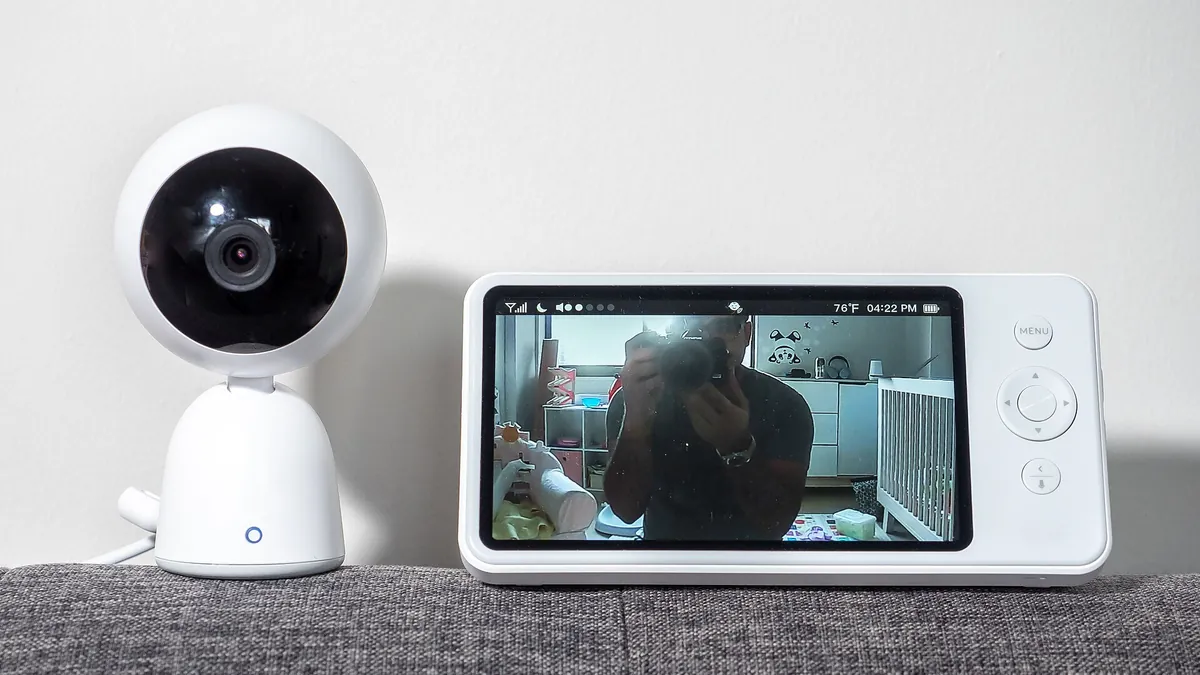
Wi-Fi Baby Monitor vs Non-Wi-Fi: Which One Should You Actually Buy?
The verdict first: in the wifi vs non wifi baby monitor fight, most families should buy the non-Wi-Fi monitor. It works when the router dies, it has no account for anyone to break into, and it never sends you a bill. Buy a Wi-Fi monitor only if you will actually check the nursery from outside the house, or you want sleep tracking badly enough to pay for it every year.
There's a third answer that didn't really exist a few years ago: a hybrid that runs on its own local screen and only touches the internet when you open the app. For a lot of two-job households, that's the one that ends the argument.
If you already know which camp you're in and just want the specific models, our full guide to the best baby monitors ranks six of them with live prices. This page is about the decision itself.
Wi-Fi vs Non-Wi-Fi Baby Monitor: The Side-by-Side
| What you care about | Non-Wi-Fi (closed system) | Wi-Fi (app camera) | Hybrid |
|---|---|---|---|
| Can someone log in from the internet? | No, there's no login | Possible if the account or company is breached | Only through the app side |
| Works with the internet down? | Yes | No | Yes, on the parent screen |
| Watch from work or dinner out? | No | Yes | Yes |
| Range | Usually advertised around 1,000 ft line of sight, less through walls | Anywhere your phone has signal | Both |
| Screen | Dedicated parent unit | Your phone | Dedicated unit plus phone |
| Ongoing cost | $0 | Often $0 for live view, paid for history and sleep data | Depends on brand |
| Setup | Plug in, pair, done | App, account, router password | Both, app optional |
Can a Wi-Fi Baby Monitor Get Hacked?
Yes, and it isn't a scare story. The cleanest example is federal: the Federal Trade Commission went after TRENDnet, a camera maker whose software flaw let anyone with a camera's internet address watch the feed. After a hacker publicized it in 2012, links to live feeds from nearly 700 cameras were posted online, and the FTC's write-up of the case specifically mentions sleeping babies in cribs. The settlement made the company fix its security and get outside audits for 20 years.
Here's the part the scary headlines skip. Most real-world break-ins on app cameras don't come from movie-style hacking. They come from boring stuff:
- Reused passwords. Your email password leaked in some breach five years ago, you used it for the monitor app, and a bot tried it.
- No two-factor sign-in. Without it, the password is the only lock on the door.
- Old firmware and an old router. Updates patch holes. A router still running WEP or the original WPA is a holdover from a different decade.
That's good news, because all three are fixable in about 15 minutes. It also means the honest answer to "are Wi-Fi monitors safe?" is "as safe as the way you set them up, plus however careful the company is with its servers." The second half you don't control.
Can a non-Wi-Fi baby monitor be hacked?
In theory, a person would need radio gear and to be physically within range, which is usually your yard or the apartment next door. Modern closed-system video monitors use digital FHSS (frequency-hopping spread spectrum), which jumps channels constantly and is encrypted on most models, so casual eavesdropping isn't a realistic worry. The old analog audio monitors from the 1990s were a different story; those could bleed into other receivers on the same channel. If you inherited one of those from your uncle, retire it.
How to Lock Down a Wi-Fi Baby Monitor in 15 Minutes
If you go Wi-Fi, do this the day it comes out of the box. All of it lines up with the FTC's own checklist for securing devices at home.
- Give the monitor account a brand-new password. Not a variation of one you already use. A password manager makes this painless.
- Turn on two-factor sign-in. If the app doesn't offer it, that tells you something about the company. Consider returning it.
- Check your router's encryption. The FTC says to use WPA3 Personal, or WPA2 if that's all you have. If your router only offers WEP or WPA, it's time for a new router, not just a new monitor.
- Change the router's admin password from whatever's printed on the sticker, and turn off remote management and WPS if you don't use them.
- Update everything. The camera firmware, the app, and the router. Turn on auto-updates where you can.
- Review who has access. Grandma got invited during the newborn haze. Your ex-babysitter did too. Clean the list every few months.
Do Wi-Fi Baby Monitors Need a Subscription?
Usually not for the basics, and that's where people get surprised later. Live video tends to be free. What costs money is the stuff that makes smart monitors smart: saved video history, sleep analytics, and longer event logs.
Nanit is the clearest example because its pricing is public. As of November 2026, Nanit's pricing page lists live streaming with no plan, then Insights tiers on top: a Sleep plan advertised at under $10 a month, Memories at $120 a year (2 days of video history), and Milestones at $300 a year (7 days of history). Do the three-year math before you compare sticker prices:
| Setup | Plan, 3 years | 3-year total (at writing) | Hardware price today | Buy |
|---|---|---|---|---|
| Infant Optics DXR-8 PRO (no Wi-Fi) | $0 | about $200 | $199.99 | Check Price |
| Nanit Pro, free tier only | $0 | about $290 | $289.99 | Check Price |
| Nanit Pro + Memories plan | $360 | about $650 | $289.99 | Check Price |
| Nanit Pro + Milestones plan | $900 | about $1,190 | $289.99 | Check Price |
Prices as of Nov 2, 2026, 7:29 PM UTC. Product prices and availability are accurate as of the date/time indicated and are subject to change. Any price and availability information displayed on Amazon.com at the time of purchase will apply to the purchase of this product.
3-year totals use hardware prices rounded at the time of writing plus Nanit's listed plan prices. Both change, so redo the math with today's numbers before deciding.
That last row is the price of nearly six DXR-8 PROs, spent on watching a sleep graph. Some parents swear the data saved their sanity during sleep training. Just know what you're signing up for.
Range, Reliability, and the 2 a.m. Test
I judge every monitor by one question: what happens at 2 a.m. when something breaks?
Non-Wi-Fi: the weak spot is range. The "1,000 feet" on the box is measured with nothing in the way. Two floors, a stone fireplace, and a refrigerator will cut that hard. Walk the parent unit to the garage, basement, and back patio during the return window and see if the picture holds.
Wi-Fi: the weak spot is everything between the camera and your eyes. Your router, your phone's battery, the app, and the company's servers all have to be working at once. Owner complaints about app monitors keep landing in the same three buckets: a lagging stream, a notification that showed up late or not at all, and an outage on the company's end that took the camera down with it. A phone that went to sleep with Do Not Disturb on is a monitor that went to sleep too.
Hybrid: the local screen covers the 2 a.m. failure, and the app is a bonus for daytime. It's the best of both, at the cost of paying for both kinds of hardware in one box.
One more reliability note that applies to all three: white noise. If you run a sound machine (and if you've read our white noise machine guide, you probably do), get a monitor with noise reduction, or the speaker turns into a waterfall.
Our Pick in Each Camp
One model per category, all pulled from the best baby monitors guide. Opinions come from published specs and owner feedback, not from a lab in my garage.

1. Infant Optics DXR-8 PRO: Best Non-Wi-Fi Monitor
- 5-inch HD parent screen, no Wi-Fi, no app, no account
- Encrypted FHSS link camera to monitor
- Active noise reduction for fans and white noise
- Remote pan, tilt, zoom; interchangeable lenses
- User-replaceable battery
This is the default "just get this one" closed system, and the PRO fixed the two old complaints: static from white noise and batteries that died after a year. There's nothing to log into, so the hacking question mostly goes away. The trade-off is the obvious one: you can't see the nursery from the office, and owners report battery life around six hours at full brightness.
- No internet, no account, no fees
- Noise reduction handles sound machines
- Swappable battery extends its life
- No remote viewing at all
- Pricey for a closed system
- Battery runs short at full brightness
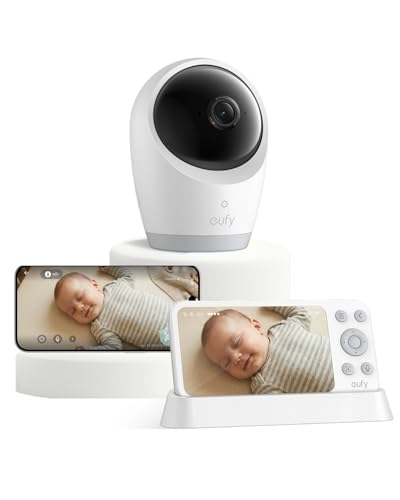
2. eufy Baby Monitor E21: Best Hybrid
- 5-inch 720p parent screen that works locally without Wi-Fi
- Optional app for remote viewing, shareable with up to 5 family members
- 4K camera with pan, tilt, and 8x zoom
- No subscription advertised for recording
- 5,000mAh battery in the camera
This is the compromise pick. The nightstand screen works with the router unplugged, and the app is there when one of you wants to peek from work. The camera battery keeps it running through a power blink. Two honest caveats: the moment you use the app, your video goes through eufy's cloud, so the Wi-Fi security checklist above applies; and eufy's earlier SpaceView monitors drew battery complaints, so register it and keep the receipt.
- Local screen plus remote app in one box
- No monthly fee advertised
- Camera battery covers outages
- Most expensive non-smart option
- App mode means trusting eufy's servers
- Older eufy models had battery complaints
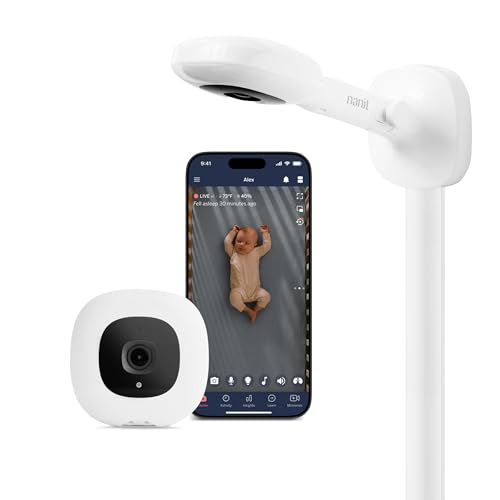
3. Nanit Pro (Wall Mount): Best Wi-Fi Monitor
- 1080p overhead camera, streams to your phone
- Live video, two-way audio, sound and motion alerts with no plan
- Sleep tracking and video history need a Nanit Insights plan
- 2.4GHz Wi-Fi only, no battery backup
If you're going full Wi-Fi, go to the one built for it. The overhead mount is what powers Nanit's sleep tracking, which tells you when the baby fell asleep and how often they woke. It's useful data when two tired parents remember the night differently. The catches: your phone is the only screen, it goes dark in an internet or power outage, and the good features are a yearly bill (see the math above).
- Best-known sleep tracking
- Sharp overhead view
- Easy to share with a partner
- No dedicated parent screen
- Sleep features cost extra yearly
- Useless when the Wi-Fi is down
Which Baby Monitor Type Fits Your House?
- Apartment or small house, parents always home at night: non-Wi-Fi. You'd hear the baby through the wall anyway; you just want to see if she's actually awake.
- Both parents work, grandparents help: hybrid, so the sitter gets a screen and you get the app.
- You live on data and your router never flinches: Wi-Fi smart camera, with two-factor on.
- You travel a lot: non-Wi-Fi. Hotel Wi-Fi and app monitors get along about as well as toddlers and naptime. Our travel baby monitor picks cover that case.
Whatever you pick, the camera placement rule doesn't change: keep the camera and every inch of its cord at least three feet from the crib. That's a safety issue, not a tech one.
Frequently Asked Questions
Are non-Wi-Fi baby monitors safer than Wi-Fi ones?
For privacy, yes. A non-Wi-Fi monitor sends video straight from the camera to the parent unit over a local radio link, so there's no online account or server for anyone to break into. A Wi-Fi monitor can be very secure too, but only if you use a unique password, turn on two-factor sign-in, and keep the firmware and router updated.
Can I use a Wi-Fi baby monitor without internet?
Most app-only monitors stop working when your internet goes down, because the video route runs through the app. Hybrid monitors are the exception: their parent screen talks to the camera directly, so the local view keeps working and only the remote app drops.
Do I need a subscription for a Wi-Fi baby monitor?
Usually not for live video. Subscriptions typically pay for saved video history and sleep analytics. Nanit, for example, lists live streaming with no plan and charges for history and sleep tracking, with tiers from under $10 a month up to $300 a year as of November 2026.
How far does a non-Wi-Fi baby monitor reach?
Many are advertised at around 1,000 feet, but that's line of sight with nothing in the way. Walls, floors, and appliances cut it a lot. Test the parent unit in the farthest spot you'd realistically be before the return window closes.
The Short Version
- For most families, a non-Wi-Fi baby monitor is the better buy: no account to hack, works without internet, and no fees.
- Buy Wi-Fi only if you'll watch from outside the house or want sleep tracking; set a unique password and turn on two-factor sign-in on day one.
- A hybrid like the eufy Baby Monitor E21 gives you a local screen that works offline plus an optional remote app.
- Nanit lists live video free, with paid plans from under $10 a month to $300 a year for history and sleep data (November 2026).
- Non-Wi-Fi range is often advertised near 1,000 feet line of sight, much less through walls.
- Keep any monitor camera and cord at least 3 feet from the crib.
Sources and Further Reading
Bottom Line: Wi-Fi or Non-Wi-Fi?
If you're stuck on wifi vs non wifi baby monitor, default to non-Wi-Fi and make the Wi-Fi side earn its spot. A closed system does the only job a monitor really has, showing you the room at 2 a.m., without asking anything of your router or your wallet. If remote viewing is a must, a hybrid gets you there without giving up the offline screen. And if you go full smart camera, spend the 15 minutes on passwords and two-factor before the baby ever goes in the crib. Then go to sleep. That's the point of the thing.
Affiliate + Accuracy Disclosure
Product specs, pricing, and availability can change. Please verify current details on Amazon before buying. Recommendations are based on published specs, owner feedback, and practical dad-focused research, not hands-on lab testing. As an Amazon Associate, I earn from qualifying purchases.